
How to Open a Cryptocurrency Wallet
While Exodus will be used as an example, this does not imply an endorsement of Exodus. You are encouraged to choose the wallet that best fits your needs.
Opening an Exodus wallet is a straightforward process. Exodus is a popular software wallet known for its user-friendly interface and support for a variety of cryptocurrencies.
https://www.exodus.com/contact-support/
Here’s a step-by-step guide to get you started:
Step 1. Download the Exodus Wallet
Visit the Website: Go to the Exodus website
(https://www.exodus.com).
Choose Your Platform: Exodus supports Windows, macOS, Linux, iOS, and Android. Select the appropriate version for your device.
Download: Click on the download link for your operating system to get the installation file.
Step 2. Install the Exodus Wallet
Run the Installer: Open the downloaded file and follow the on-screen instructions to install the Exodus wallet on your device.
Complete Installation: Once installed, open the Exodus application.
Step 3. Set Up Your Wallet
Create a New Wallet: When you first open Exodus, you’ll be prompted to create a new wallet. Click on “Create New Wallet” to begin.
Set a Password: Choose a strong, secure password for your wallet. This password will be required to access your wallet and make transactions.
Backup Your Wallet: Exodus will provide you with a backup phrase (a series of words). Write down this backup phrase and store it in a secure location. This phrase is crucial for recovering your wallet if you lose access to your device or forget your password.
Step 4. Verify Your Backup Phrase
Confirm Your Backup Phrase: Exodus will ask you to verify your backup phrase by entering a few of the words. This ensures you’ve written it down correctly and understand its importance.
Step 5. Access Your Wallet
Explore the Dashboard: Once setup is complete, you can access your wallet dashboard. From here, you can view your cryptocurrency balances, send and receive funds, and explore additional features.
Step 6. Secure Your Wallet
Enable Security Features: Exodus allows you to set up additional security features, such as password protection and backup reminders. Make sure these are enabled to keep your wallet secure.
Keep Your Backup Phrase Safe: Store your backup phrase in a secure location, separate from your device. This will be essential for recovering your wallet if needed.
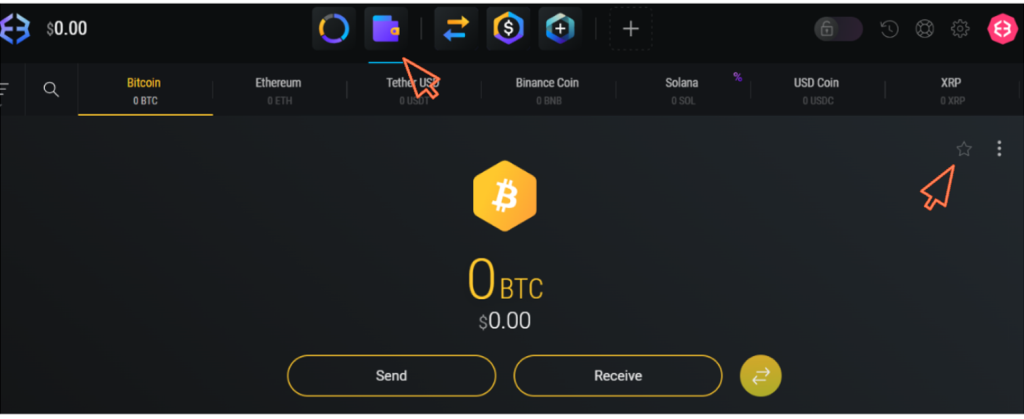
Step 7: Select Your Favourite Currencies (in this case BTC and XRM)
On the homepage, second from the left at the top, you will find your Wallet. Click on the Wallet tab
Locate Your Bitcoin (BTC) Wallet
- Find Your Bitcoin Wallet: Under Wallets, find your Bitcoin (BTC) Wallet. If you have already marked it as a favourite, it will display on the left of all available wallets.
- Search for BTC: If you have not yet marked it, search for it by clicking on the search icon and typing in BTC. Your BTC wallet will appear. Click on it. Click on the star on the far right. This will now save the currency as a favourite.
- Do the same for Monero (XRM)
Additional Tips
Keep Software Updated: Regularly update your Exodus wallet to ensure you have the latest security features and improvements.
Use Strong Passwords: Create a strong, unique password for your wallet to protect it from unauthorized access.
Be Cautious with Your Backup Phrase: Never share your backup phrase with anyone and avoid storing it digitally in unsecured locations.
By following these steps, you’ll have a fully set-up Exodus wallet ready for managing your cryptocurrencies.
Contact Support
For any issues with your wallet or transactions, contact the support team of your wallet provider or the cryptocurrency company you are dealing with.
Disclaimer:
The information presented on this page is intended solely for educational purposes and should not be construed as professional advice. References to third-party products, services, or companies are not endorsements and are provided for informational purposes only. We disclaim responsibility for the accuracy or reliability of such third-party information and shall not be liable for any losses incurred as a result of its use. Users are advised to conduct independent research and consult with qualified professionals prior to making any decisions based on the information provided here.